This page introduces the basic concepts and terminology used in theDocumentation Index
Fetch the complete documentation index at: https://mintlify.com/tanstack/form/llms.txt
Use this file to discover all available pages before exploring further.
@tanstack/vue-form library. Familiarizing yourself with these concepts will help you better understand and work with the library.
Form Options
You can create options for your form so that it can be shared between multiple forms by using theformOptions function.
Form Instance
A Form Instance is an object that represents an individual form and provides methods and properties for working with the form. You create a form instance using theuseForm composable.
With Form Options
Standalone
You may also create a form instance without usingformOptions:
Field
A Field represents a single form input element, such as a text input or a checkbox. Fields are created using theform.Field component provided by the form instance. The component accepts a name prop and uses a scoped slot via the v-slot directive.
Field State
Each field has its own state, which includes its current value, validation status, error messages, and other metadata. You can access a field’s state using thefield.state property.
Field Metadata
There are four states in the metadata that track how the user interacts with a field:- isTouched - Set after the user changes the field or blurs the field
- isDirty - Set after the field’s value has been changed, even if it’s been reverted to the default (opposite of
isPristine) - isPristine - Remains true until the user changes the field value (opposite of
isDirty) - isBlurred - Set after the field has been blurred
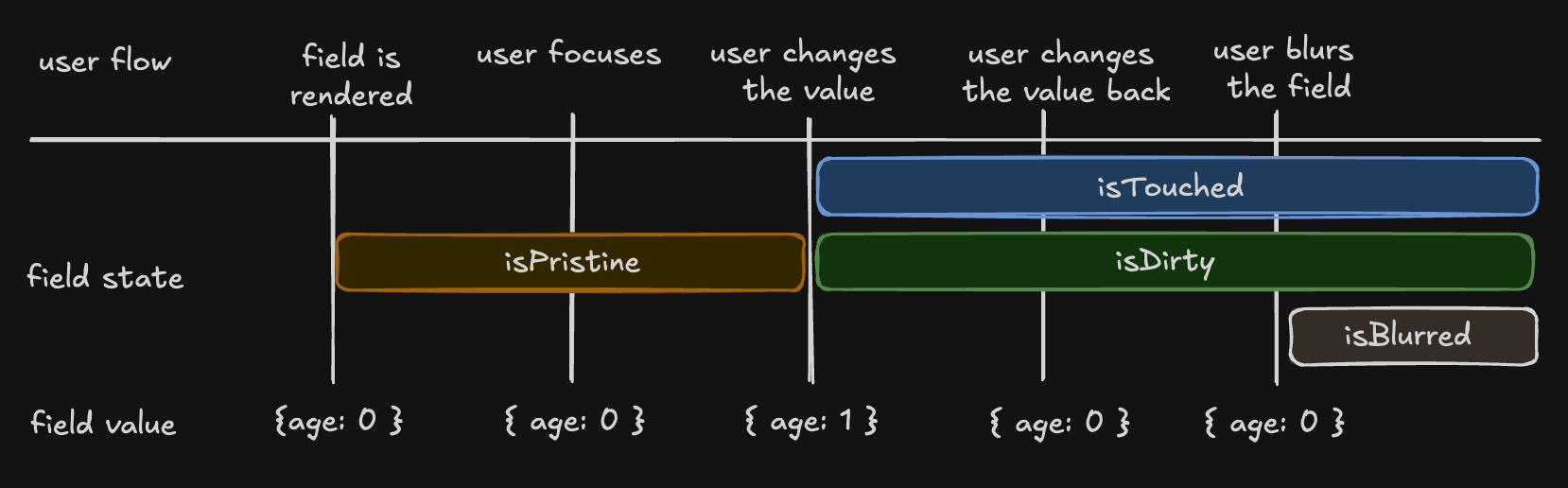
Understanding ‘isDirty’
TanStack Form uses a persistent ‘dirty’ state model:- A field remains ‘dirty’ once changed, even if reverted to the default value
- This is similar to Angular Form and Vue FormKit
- Different from React Hook Form, Formik, and Final Form (which use non-persistent dirty state)
isDefaultValue flag:
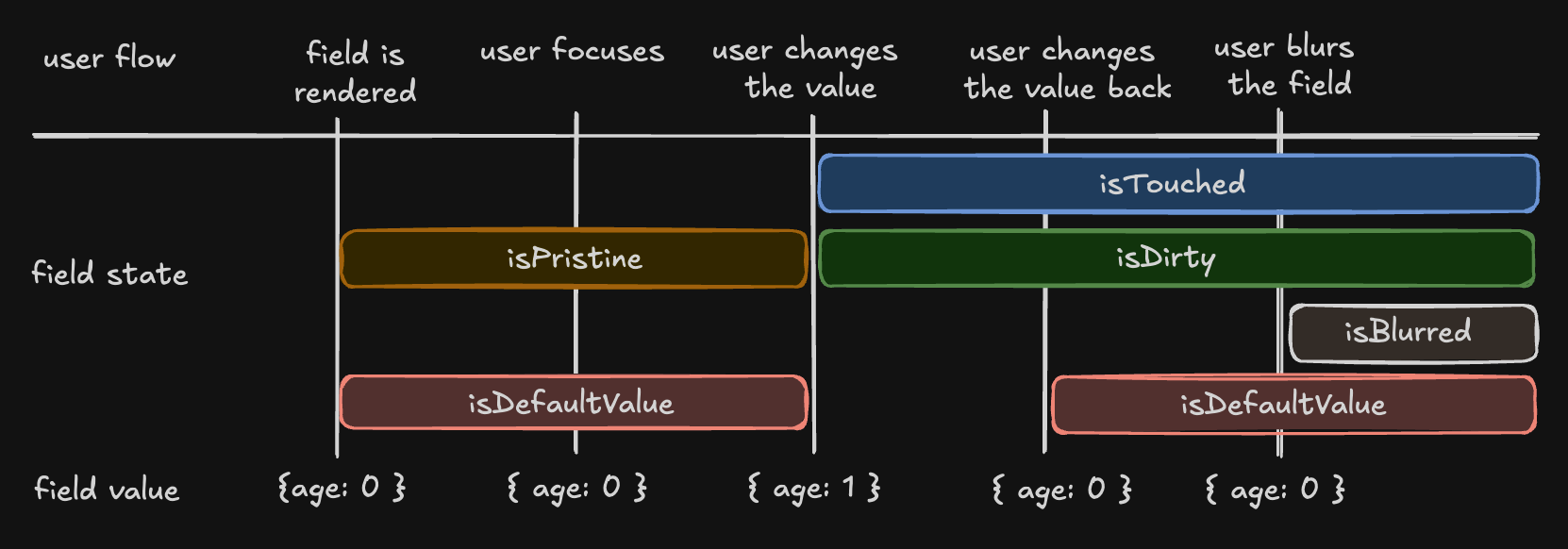
Field API
The Field API is an object provided by a scoped slot using thev-slot directive. This slot receives an argument named field that provides methods and properties for working with the field’s state.
Validation
@tanstack/vue-form provides both synchronous and asynchronous validation out of the box. Validation functions can be passed to the form.Field component using the validators prop.
Standard Schema Libraries
TanStack Form supports the Standard Schema specification. You can define a schema using any of these libraries:- Zod (v3.24.0 or higher)
- Valibot (v1.0.0 or higher)
- ArkType (v2.1.20 or higher)
- Yup (v1.7.0 or higher)
Reactivity
@tanstack/vue-form offers various ways to subscribe to form and field state changes, most notably the form.useStore method and the form.Subscribe component.
Using useStore
Using Subscribe Component
The usage of the
form.useField method to achieve reactivity is discouraged since it is designed to be used thoughtfully within the form.Field component. Use form.useStore instead.Listeners
@tanstack/vue-form allows you to react to specific triggers and “listen” to them to dispatch side effects.
Array Fields
Array fields allow you to manage a list of values within a form, such as a list of hobbies. You can create an array field using theform.Field component with the mode="array" prop.
When working with array fields, you can use these methods:
pushValue- Add a value to the end of the arrayremoveValue- Remove a value at a specific indexswapValues- Swap two values at different indicesmoveValue- Move a value from one index to anotherinsertValue- Insert a value at a specific indexreplaceValue- Replace a value at a specific indexclearValues- Clear all values in the array
@tanstack/vue-form library. Understanding these concepts will help you work more effectively with the library and create complex forms with ease.